Google Maps launched Ask Maps in March 2026, powered by Gemini, and the outdoor planning community took notice. A conversational layer on top of the world's most-used mapping tool sounds like exactly what multi-day trip planners have been waiting for.
So is it? And how does it actually compare to Xploreum, a platform built specifically for adventure trip planning from the ground up?
Here is what each tool actually does, where Ask Maps runs out of road, and what matters when you are planning a real outdoor trip rather than just getting directions to a trailhead.
What Google Maps Ask Maps Actually Does
Ask Maps is a conversational search layer inside Google Maps. You type a question, Gemini processes it, and the map surfaces relevant places and points of interest in response.
Ask something like "good hiking near Banff for a weekend" and you will get a curated list of trails and nearby spots with ratings and photos. For browsing options in an unfamiliar region, it is a genuine upgrade over typing keywords into a search bar.
The limitation is that Ask Maps is still, at its core, a search interface. It finds places. It does not build a trip.
There is no day-by-day structure. No campsite sequencing. No resupply logic. No driving legs between overnight stops. You get a list of results and a map with pins, and then the planning work is still entirely yours.
Even the stop order is on you: Google Maps directions hold a starting point plus nine stops and never reorder them, which is why drivers with longer routes turn to a dedicated multi-stop route planner.
For a quick day hike or a city weekend, that is probably fine. For a four-day backcountry loop in Mauricie or a multi-stop road trip through the Pacific Northwest, you are right back to the same problem: six tabs open, three Reddit threads deep, still no campsite confirmed.
What Xploreum Does Differently
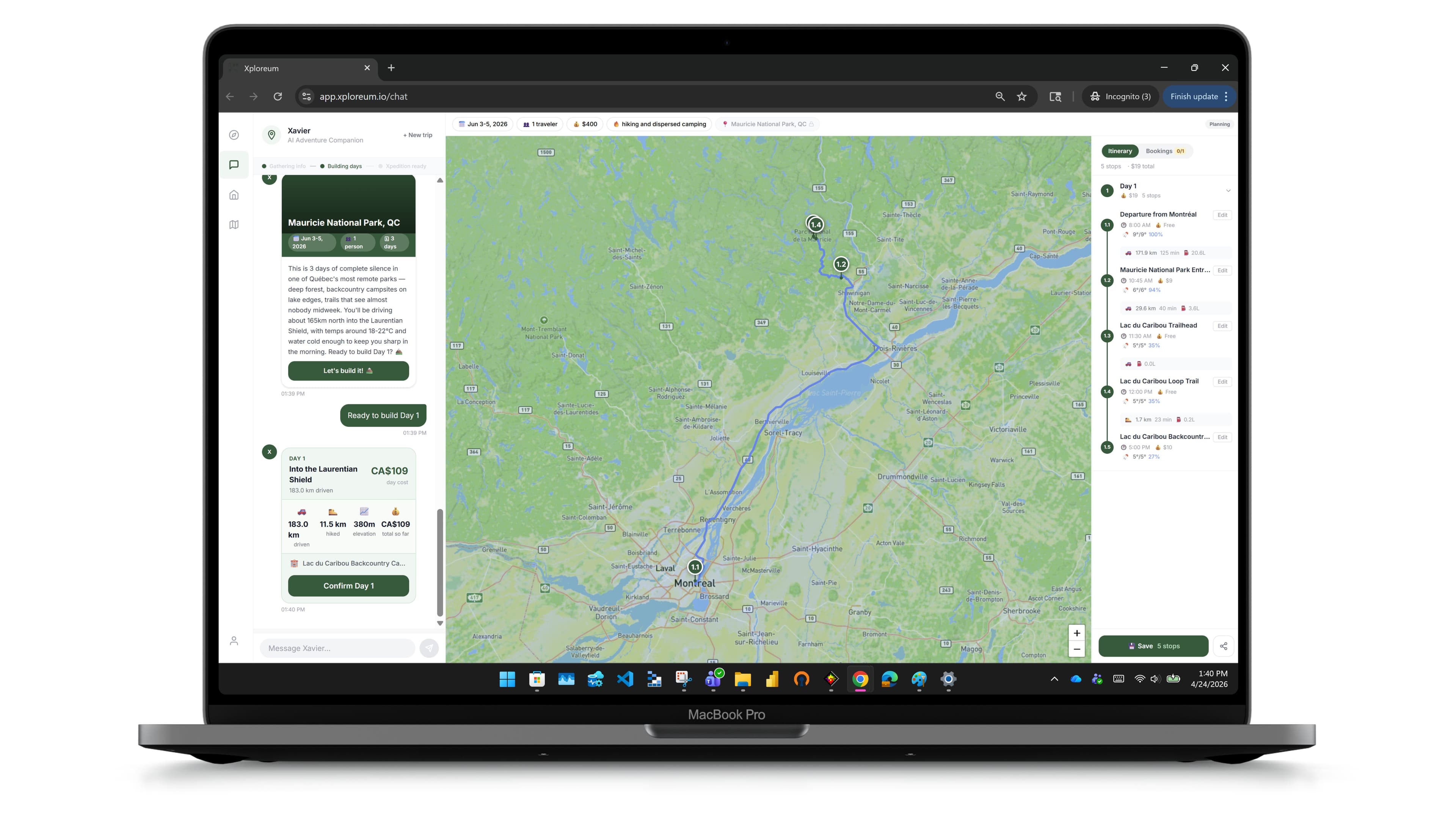
Xploreum starts from a different premise. You describe the trip you want in plain language. Xavier, Xploreum's AI companion, asks for any missing details and confirms a short trip brief with you, then builds the Xpedition one day at a time, and you confirm each day before the next.
That Xpedition is not a list of suggestions. It is a structured, day-by-day plan with driving legs between stops, trailheads, campsites, resupply points, and an interactive map with route pins. Before Day 1 is built, you see a one-glance trip brief and can adjust it using chips or plain text. Each day starts where the last one ended, so what you end up with is actually usable.
The difference from Ask Maps comes down to depth. Ask Maps answers a question. Xavier builds a plan.
Head-to-Head: Where Each Tool Stands
Conversational Planning
Ask Maps accepts natural language input and returns relevant map results. The conversation is relatively shallow, typically focused on helping you discover places rather than refining a complete trip around your group size, fitness level, or camping preferences.
Xavier asks follow-up questions in plain language. The conversation is the planning process. By the time an Xpedition generates, Xavier has understood what kind of trip you actually want, not just what region you are heading to.
Adventure-Specific Routing
Ask Maps can help you discover places and routes, but it does not build or sequence a multi-day backcountry trip around campsite availability, resupply logistics, or driving distance between overnight stops.
Xploreum's routing logic is built specifically for outdoor adventures. An Xpedition accounts for driving legs, trailhead access, campsite placement, and where you need to restock. That structure matters when you are four days from a grocery store.
Provider Booking
Ask Maps can surface a business listing, but finding a guide who works your route, a remote lodge, or transport to a trailhead means leaving the app and starting over somewhere else.
Xploreum connects you with Xperts: local guides, lodge keepers, and outfitters surfaced because they fit the route, season, and skill level in your Xpedition. You book directly with the provider, then attach the confirmation to your Xpedition so the reservation sits with the rest of the plan. Xavier helping complete those bookings is in development, not live today.
Saving and Sharing Plans
Ask Maps can save places to a list and share them with friends, but it does not produce a saveable, shareable day-by-day trip plan.
A free account saves your Xpeditions. Xplorer Pro opens the full saved plan, lets you edit it with Xavier, and creates a read-only link for the friends coming with you. Want to reference last summer's route? It is all there.
A Realistic Scenario
Say you want five days in Quebec's wilderness, starting from Montreal, with two nights of backcountry camping, one night at a lodge, and a guided canoe day somewhere in Mauricie.
With Ask Maps, you would search for trails in Mauricie, browse results, search separately for canoe guides, look up lodges, try to work out the driving sequence, and eventually piece it together across multiple tabs and apps.
With Xploreum, you describe that trip to Xavier. He asks about your group, your fitness level, whether you want to paddle or portage, and what kind of lodge experience you are after. Then he builds the Xpedition: driving legs from Montreal, campsite nights sequenced around the trail, a lodge stop, and a canoe day with a local guide surfaced for that stretch of the route. One conversation. One plan.
That is not a marginal difference. It is a different category of tool.
When Ask Maps Is the Right Choice
Ask Maps is genuinely good at what it does. If you want to explore what is near a location, find a trail you have not heard of, or get a quick read on an area before committing to a plan, it is fast and capable.
It is also free and already on most people's phones.
If your planning needs stop at discovery, Ask Maps works well. The gap opens the moment you need a structured, multi-day plan: camping logistics, resupply, and the local guides and outfitters that fit the route.
The Honest Summary
| Google Maps Ask Maps | Xploreum | |
|---|---|---|
| What it is | Conversational search inside Google Maps | AI agent companion for outdoor adventure travel |
| Output | Places, pins, ratings, and photos | Structured day-by-day Xpedition with a routed interactive map |
| Multi-day structure | No | Yes: driving legs, trailheads, campsites, resupply stops |
| Booking | Restaurant reservations only; otherwise surfaces listings | Not yet; guides and outfitters surfaced in context, and your own confirmations attach to the plan |
| Save & share | Places save to a list and share; no trip plan | Saving is free; full saved plan and read-only share link with Xplorer Pro |
| Price | Free | Free account; Xplorer Pro $79/yr, renews at $79 |
Ask Maps is a discovery tool. Xploreum is an AI agent companion for outdoor adventure travel. They solve different problems, and knowing which one you actually need saves a lot of time.
If you are planning a real multi-day trip and want a full Xpedition built around your specific route, dates, and style, head to xploreum.io and chat with Xavier.
For a worked example of that shape of trip, see the national parks road trip planner. For the wider category, the best apps for planning and booking hiking and camping trips covers where each tool stops.
Turn what you read into a trip.
Bring the route, campsites, and stops together with Xavier.
Frequently asked questions
What is Google Maps Ask Maps and when did it launch?
Ask Maps is a conversational search feature inside Google Maps, powered by Google's Gemini AI. It launched in March 2026 and lets you ask natural language questions to surface relevant places, trails, and points of interest on the map.
Can Google Maps Ask Maps plan a multi-day outdoor trip?
Not in any structured way. Ask Maps returns relevant results for a query but does not build a day-by-day itinerary, sequence campsites, account for resupply stops, or produce a saveable day-by-day trip plan. It is a discovery tool, not a trip planner.
What does Xploreum produce that Ask Maps does not?
Xavier builds a complete Xpedition: a structured, day-by-day outdoor trip plan with driving legs, trailheads, campsites, resupply stops, and an interactive map. Saving is free. Xplorer Pro opens the full saved Xpedition and adds editing with Xavier, a read-only share link, and a booking log where you record your own confirmations. Ask Maps produces search results, not a structured plan.
Can I book guides or lodges through Google Maps Ask Maps?
No. Ask Maps can surface business listings, but booking a guide, lodge, or outfitter means leaving the app entirely. Xavier surfaces guides, lodges, and outfitters that fit your Xpedition, and you can attach the confirmations you make to the plan. Check each provider's own credentials before you book.
How much does Xploreum cost compared to Google Maps?
Google Maps and Ask Maps are free. Xplorer Pro is $79 a year, and it renews at $79 a year; members who joined earlier keep the plan they signed up with. A free account lets you chat with Xavier, build an Xpedition day by day, and save it. Xplorer Pro opens the full saved plan and adds editing with Xavier, a read-only share link, and the booking log.
Who is Xploreum actually for?
Anyone planning a real outdoor trip who does not want to spend hours across multiple apps piecing together a plan. You do not need to be an experienced outdoors person. If you want to spend time in nature and want someone to handle the logistics, that is exactly who Xavier is built for.
Sources
- Google: Ask Maps and Immersive Navigation, new AI features in Google Maps. Accessed October 5, 2026.
- Google: The latest AI news we announced in March 2026. Accessed October 5, 2026.
- Google Maps Help: Get directions and show routes in Google Maps. Accessed October 5, 2026.