Published by Xploreum. This documentation-based comparison was researched on October 5, 2026. It is not an independent review, a controlled benchmark, or a report of field testing.
The difference that matters
Choose Xploreum to evaluate an outdoor-focused itinerary workflow. Choose Wanderlog to evaluate a general travel organizer with collaborative planning and reservation tools.
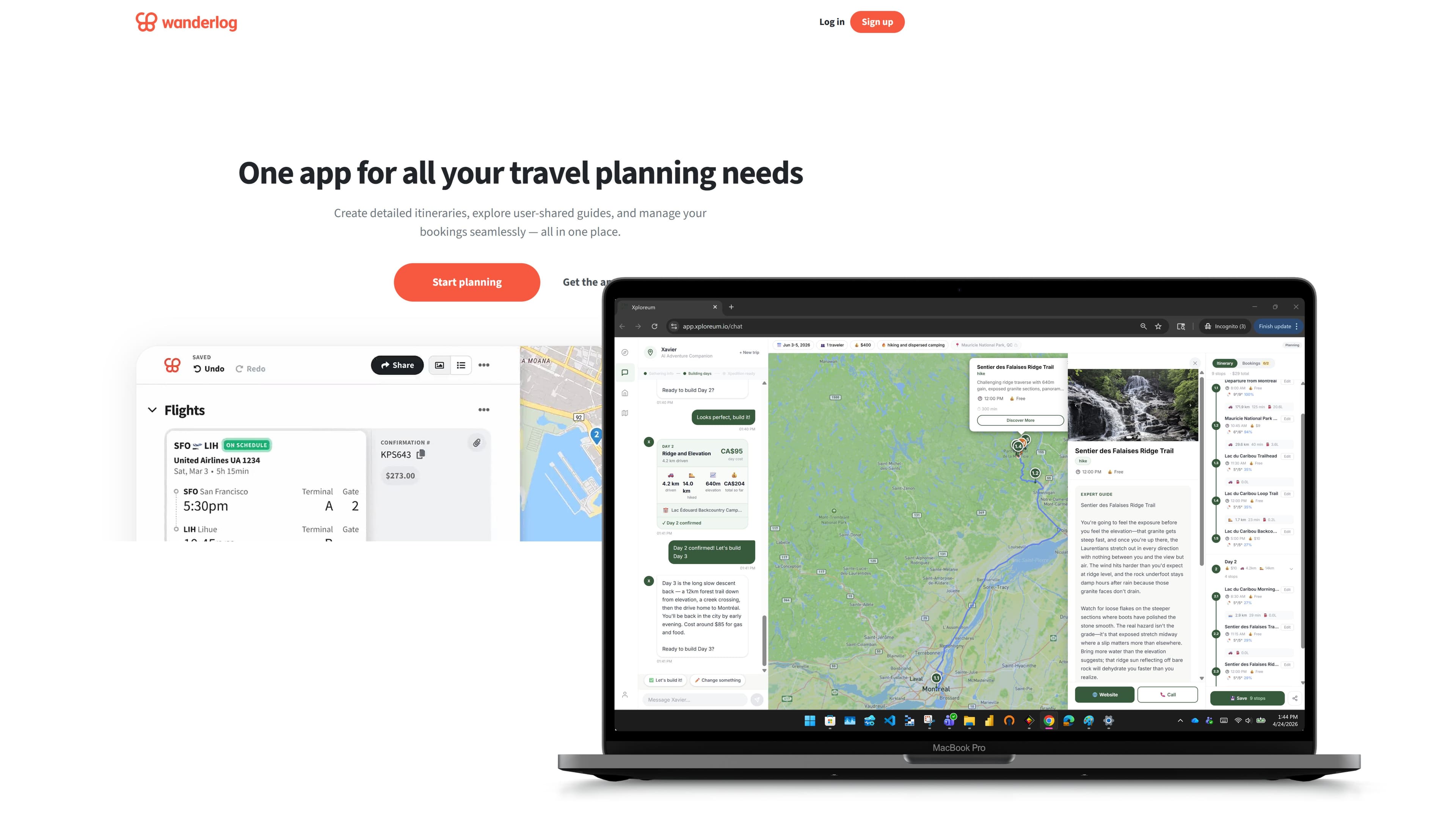
Both products offer AI assistance, so the choice in Xploreum vs Wanderlog is not automated planning versus doing everything by hand. Wanderlog has its own AI trip planner. Xploreum's planning runs through Xavier, its AI adventure companion, which builds a day-by-day outdoor Xpedition on an interactive map from a conversation.
For a backcountry journey, compare what happens between the initial idea and the confirmed trip. Then evaluate offline navigation as a separate question. Xploreum does not currently offer native offline maps. Wanderlog Pro's offline trip records are useful, but they do not, by themselves, establish specialist trail-navigation capability. Neither product is a native offline topographic navigator.
Xploreum and Wanderlog at a glance
| Decision | Xploreum | Wanderlog |
|---|---|---|
| Starting the itinerary | Xavier develops an outdoor Xpedition through a planning conversation. | An AI trip planner can generate itinerary suggestions and help develop a trip. |
| Outdoor emphasis | Driving legs, trailheads, hiking stages, campsites, and resupply stops are organized as one journey. | General-purpose itinerary tools can hold the trip's places and records. |
| Working with companions | Xplorer Pro includes a read-only share link; companions cannot edit. | Companions can be invited with "Can view" or "Can edit" permissions. |
| Reservation records | Booking details are entered by the traveler in a booking log. | Supported flight, hotel, and rental car details can be imported from forwarded emails. |
| Budget and expenses | Budget is a planning input, not an expense tracker. | Expense tracking and splitting are available. |
| Route order | Builds the trip's sequence around the outdoor plan. | Wanderlog Pro can optimize the order of stops. |
| Offline use | Native offline maps are not currently available. | Wanderlog Pro supports downloaded trip records on mobile. |
Sharing a plan is not the same as simultaneous collaborative editing. Likewise, storing a booking confirmation is not the same as importing it automatically or completing a booking. These distinctions are worth checking before moving a group trip.
What is Wanderlog?
Wanderlog is an itinerary and travel-organization platform for vacations, road trips, and group travel.
Travelers can add places to an itinerary, view them on a map, schedule activities by day, see travel times between stops, keep notes and attachments, and invite companions to plan together. Its reservation tools can pull supported flight, hotel, and rental car details from forwarded confirmation emails, and its budgeting tools track and split expenses.
Wanderlog also has an AI trip planner. Its AI tools can generate itinerary content, suggest places such as attractions and restaurants, and answer questions about a destination. Suggested places can then be added to the trip.
That makes Wanderlog a broad workspace for trips like these:
- Four days of attractions and restaurants in Chicago.
- A California road trip with hotels and scenic stops.
- A group vacation where several travelers contribute ideas.
- A multi-city trip with flights, bookings, budgets, and daily schedules.
What is Xploreum and Xavier?
Xploreum is an outdoor trip-planning product. Xavier is Xploreum's AI agent companion for planning outdoor adventures.
Instead of beginning with a blank itinerary, you begin with a conversation. You can describe what you want in plain language:
"I want a three-day camping trip within four hours of Montreal. I'm comfortable hiking, but I don't want anything too technical."
Xavier then asks for the details that shape the trip, such as your start, destination, dates, group size, skill level, budget, vehicle, and preferred activities. From those, it confirms a short trip brief, then builds the Xpedition on an interactive map one day at a time, and you confirm each day before the next. Depending on the trip, an Xpedition can include driving legs, trails, trailheads, campsites, stays, fuel, meal, and resupply stops, activities, and local providers.
A free account can save the plan. Xplorer Pro, the paid plan, opens the complete saved Xpedition and adds editing with Xavier, a read-only share link, the booking log, and, on mobile, handing one stop at a time to Apple Maps or Google Maps. Xavier's memory of your preferences is on free accounts too.
The objective is not a list of attractions. It is a connected outdoor plan that considers how you get there, where the activity begins, where you stay, and what you may need along the way.
Both products can help create the trip
Wanderlog's AI tools can suggest places and produce itinerary content. Describing it as an organizer that only works after you have selected every stop would leave out a documented part of the product.
Xploreum's stated focus is the outdoor journey. Its backpacking workflow brings walking days and overnight stops into the itinerary.
Compare the proposed plan against the constraints you supplied, rather than deciding from the presence of an AI label. Did the itinerary preserve the fixed arrival date? Did a walking stage end where the overnight arrangement is possible? Did the return transfer remain in the schedule after you changed a hiking day?
These are evaluation questions, not claims that either app has passed a controlled test.
Where Wanderlog can be the better fit
Consider keeping Wanderlog when an existing group already uses its collaboration and reservation workflow. That can matter even when the trip contains several hiking days. The organizer for the whole trip does not have to be the app you use to follow a trail.
Planning with a group
Wanderlog lets you invite companions to a trip and choose whether each one can view or edit it. Several people can add ideas to the same itinerary without juggling separate documents or long group-message threads. If your group wants everyone editing one plan, this is a real difference from Xploreum, where Xplorer Pro shares a finished plan rather than offering editing permissions to companions.
Managing reservations and expenses
Wanderlog can import supported flight, hotel, and rental car details when you forward the confirmation email. Its expense tools track spending and split costs between travelers.
These features are most useful on larger group trips with several conventional bookings. On Xploreum, by comparison, the traveler enters booking details manually in the booking log after booking separately.
Optimizing the order of stops
Wanderlog Pro can rearrange selected stops into a more efficient order. This helps when a traveler already has a list of must-see places along a road trip.
Evaluate that for the day's travel sequence, but do not interpret an optimized order as a judgment about backcountry conditions or trail difficulty.
Avoid recreating a settled itinerary just to change software. Make the missing outdoor requirement explicit, then decide whether a specialist app resolves it.
Where Xploreum is worth evaluating
Consider Xploreum when the trip is still a collection of outdoor ideas that needs a coherent schedule.
Planning around outdoor ability
Outdoor trips depend heavily on experience and comfort. A route that suits an experienced backpacker may be unrealistic for someone planning a first overnight trip. Daily distance, elevation, road access, and where the night ends can change whether a plan works at all.
Xavier's planning conversation asks about skill level and other practical constraints before producing the Xpedition, so those inputs shape the plan rather than being added later. You still decide whether each proposed stage is right for your group.
Connecting the whole outdoor trip
An outdoor itinerary is more than a list of points on a map. A workable plan may need to connect:
- The drive from home.
- A trailhead or launch point.
- Daily activity segments.
- Campsites or other stays.
- Fuel, meal, and resupply stops.
- Local guides, outfitters, or activity providers.
- The return journey.
Xavier is built around this connected planning problem. Changing one day is a change to the whole journey, not to an isolated pin.
Bringing local outdoor knowledge into the plan
An Xpedition can include local providers such as guides, outfitters, lodges, and activity operators. This is different from surfacing popular attractions or highly rated restaurants: the aim is to point to local services that could help make the outdoor trip possible. Check each provider directly before relying on them.
A fictional evaluation brief
A useful evaluation brief includes the available days, the group, the intended activities, fixed arrangements, and the decisions that are still open. For example, this is a fictional brief, not an actual app result:
We have six days and one vehicle. We want a three-day hike with two backcountry nights. Keep an arrival night before the hike and a recovery night afterward. We have not confirmed the campsites or the vehicle return. Separate proposed arrangements from details we still need to verify.
Use the resulting draft as a starting point for review. Check whether the hike, overnight stops, and surrounding travel still fit together. Do not interpret a polished itinerary as evidence that a booking or access requirement has been resolved.
Xploreum currently leaves booking completion to the traveler. The booking log records details the traveler adds afterward.
Offline access: compare the actual information
Wanderlog's offline help article describes downloaded plans containing notes, places, and attachments. That is useful trip information, but it does not establish a specialist topographic navigation workflow.
Xploreum's documentation states that native offline maps are not currently available. It would therefore be misleading to present Xploreum as the offline-navigation upgrade from Wanderlog. See our note on offline maps and campsite booking limitations for how those gaps are usually filled.
Make an offline information list before choosing software. Separate the booking reference and trailhead address from the route, map area, and functions required during the hike. An itinerary may cover the first group while a dedicated mapping app covers the second.
For the field setup, include navigation skills, a backup, and power planning. The National Park Service's ten essentials guidance is a useful starting point, not a substitute for destination-specific advice.
A fair way to compare the same trip
Use the same brief, constraints, and evaluation questions in both tools. Record observations rather than assigning a score from memory.
| Check | What a useful result should show | What still requires your review |
|---|---|---|
| Fixed arrangements | The correct dates and locations remain in the plan. | Whether changes conflict with bookings or transport. |
| Daily structure | Each day has a clear start, main activity, and overnight intention. | Whether the proposed stage is appropriate for the group. |
| Unconfirmed decisions | Missing campsites, transfers, or supplies remain visible. | Confirmation with the responsible provider or authority. |
| Group workflow | Companions can access the information they need. | Whether sharing or editing permissions fit your process. |
| Offline preparation | Required records and field information have an assigned home. | Whether each item works on the actual device without service. |
This is our suggested comparison method. No results, completion times, or reliability ratings are implied.
Is Xploreum a Wanderlog alternative?
Xploreum can be a Wanderlog alternative for travelers whose main goal is planning an outdoor adventure. It is not a replacement for every Wanderlog feature.
Wanderlog is stronger as a general itinerary workspace, especially for collaborative editing with permissions, email-forward reservation imports, expense splitting, and organizing a long list of known places. Xploreum is worth evaluating when the traveler needs help deciding what the outdoor trip should be and how its parts fit together.
Some travelers use the tools at different stages. Xavier can help shape the outdoor plan, while a general organizer coordinates a larger vacation around that adventure, and a dedicated mapping app handles navigation in the field.
Switching without losing confirmed details
Before moving a trip, identify the current source of truth for dates, locations, and reservations. Preserve that information until the replacement has been checked.
Our recommended transfer process is to copy confirmed arrangements first, review the new daily sequence second, and prepare the field route separately. Keep unresolved suggestions distinct from bookings. Tell companions which version is now authoritative.
Do not assume an automatic Wanderlog import into Xploreum or automatic synchronization between the two. Those functions were not established by the documentation reviewed for this comparison.
Similarly, opening an Xploreum stop in a supported navigation app is a waypoint handoff, not proof that an entire backcountry route and its offline maps have been transferred.
Which one should you choose?
Consider Wanderlog for a traditional vacation, road trip, or group trip where organizing places, reservations, expenses, and group contributions is the main challenge, or where your group already works in it.
Consider Xploreum for an outdoor trip where the destination, daily stages, difficulty, campsites, resupply, and local providers still need to work together.
In either case, plan the field navigation separately. The simplest distinction is this: Wanderlog is a broad travel workspace with AI help and strong group tools. Xploreum, through Xavier, is built to shape the outdoor journey itself.
Frequently asked questions
Is Xploreum better than Wanderlog for every outdoor trip?
No universal winner is established here. Our recommendation is to choose the workflow that solves the unresolved part of your trip, while retaining tools that already work for your group. Xploreum is focused on routes, trailheads, campsites, skill level, and local outdoor services. Wanderlog is broader, with strong tools for collaborative itineraries, reservations, and expenses.
Does Wanderlog have an AI trip planner?
Yes. Its official AI planner page describes generated itineraries and planning assistance. The comparison should be about workflow and requirements, not the assumption that only one product has AI.
Is Wanderlog good for hiking trips?
Wanderlog can organize hiking locations, accommodations, reservations, and driving stops. Hiking-specific details such as route suitability, campsite logistics, permits, or resupply planning may require additional research and tools.
Which one can I use offline?
Wanderlog Pro documents offline trip-plan access. Xploreum does not currently provide native offline maps. Neither statement establishes that your specific field-navigation requirements are satisfied.
Can Xavier plan camping trips?
Yes. Xavier is designed to plan outdoor experiences such as hiking, camping, road trips, paddling, and multi-day adventures. Depending on the trip, an Xpedition can include driving legs, trailheads, campsites, resupply stops, meals, and relevant local providers.
Does a suggested campsite mean it is reserved?
No. For Xploreum, the traveler completes bookings separately and can record the details in the booking log. For U.S. national park backcountry travel, check the destination's requirements before treating an overnight plan as confirmed.
Can I use both Xploreum and Wanderlog?
Yes. Xploreum can help create the outdoor-focused plan, while Wanderlog can organize broader vacation details, group contributions, reservations, and expenses. Copy confirmed details between them by hand, since no automatic sync between the two was found.
The decision
Choose based on the work you need to complete, not a promise that one app replaces every part of your setup. For a wider comparison of navigation and trail tools, read Wanderlog alternatives for backcountry and off-grid trips. For the broader landscape, see the best AI trip planners for outdoor adventures in 2026, or compare Xavier and Mindtrip.
To explore an outdoor-specific itinerary, start a conversation with Xavier. Keep the confirmed travel plan and the field-navigation plan consistent with each other.
Turn what you read into a trip.
Bring the route, campsites, and stops together with Xavier.
Sources
- Xploreum: Product FAQ. Accessed October 5, 2026.
- Wanderlog: Trip planning features. Accessed October 5, 2026.
- Wanderlog: AI trip planner. Accessed October 5, 2026.
- Xploreum: Published campsite-booking and offline-navigation limitations. Accessed October 5, 2026.
- Wanderlog Help Center: Download trip plan for offline access. Accessed October 5, 2026.
- Xploreum: AI Trip Planner for Backpacking. Accessed October 5, 2026.
- Wanderlog Help Center: Add friends to plan together. Accessed October 5, 2026.
- Wanderlog Help Center: Add flight, hotel, and rental car details by forwarding an email. Accessed October 5, 2026.
- Wanderlog Help Center: Optimize route. Accessed October 5, 2026.
- National Park Service: Ten essentials. Accessed October 5, 2026.
- National Park Service: Wilderness and backcountry camping. Accessed October 5, 2026.